

Before you read more of this blog, please read this.
We wrote this blog post for people who want customers. The goal of this blog is to help small business owners, freelance professionals, or anyone with an entrepreneurial spirit who owns a website gain more customers. While blogging can serve as an immensely meaningful creative outlet, it doesn’t always. Blogging, or at least the kind you’re reading about here, is designed to engage your customers, solve the problems of your customers, and move them up your sales funnel.
So, while you’ll benefit from reading this article, please know that this is blogging to sell. This is not blogging to create, for the sake of creativity, or for the especially creative. Again, blogging can be an incredibly creative endeavor. But blogging to sell is creative problem-solving, not creative expression. You’ve been warned (and welcome to keep reading).
Why You Must Use Data to Guide Your Blogging Strategy
The trick to blogging to sell is blogging about what your customers want. To do that, the blogger must buy into at least two marketing principles.
- The customer is the hero, not your brand.
- Customers want their problems solved more than your services.
These are the first two principles of Donald Miller’s Building a StoryBrand.[1][2] And while there are seven in total, those first two are at the heart and center of blogging strategy.
How come? If you don’t keep the customer’s needs in mind first, you’ll come to the blank canvas of a Google Doc wanting to write about the intricacies of your services. That often results in writing about a bunch of drivel (though it might be precious to you) that your clients never search for. And since they’re never searching for it on Google, they never arrive at your website.
And speaking of “searching on Google,” that brings us to the crux of all this. A tool exists to help you keep your customers’ wants in mind. And it’s that tool you’ll need ASAP. Best thing about said tool is that it’s free…
How to use Google Search Console to Help You Blog
To leverage valuable data in your blog strategy, use Google Search Console. Google Search Console shows you the exact search words your customers are using. I’ll write that again.
GOOGLE SEARCH CONSOLE SHOWS YOU THE EXACT SEARCH WORDS YOUR CUSTOMERS ARE USING (see below).
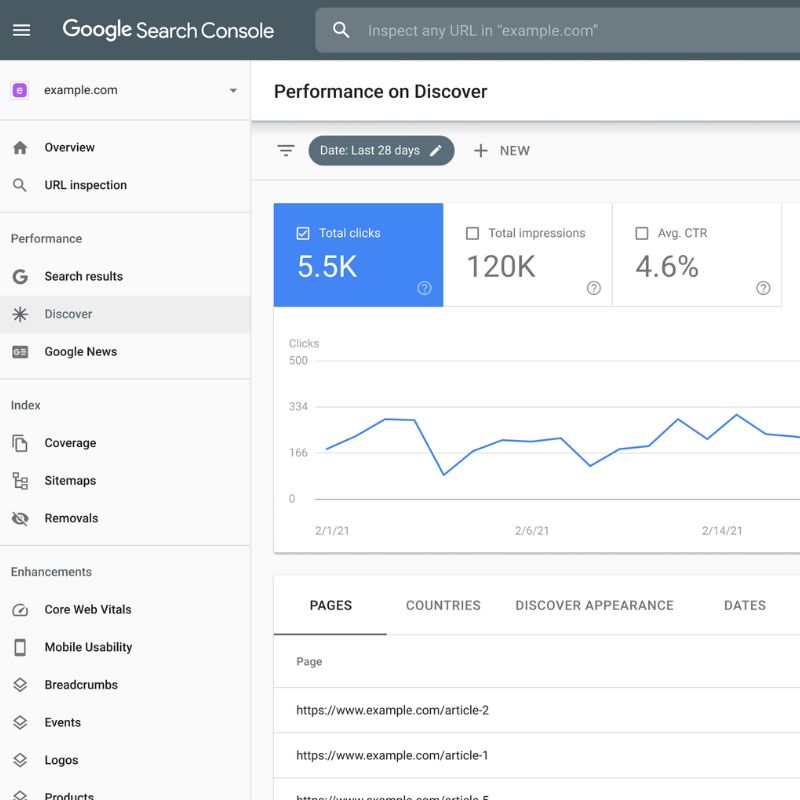
That’s a sunburst of good news for you. By understanding what your customers are searching for, you can leverage that data to attract more visitors to your website. But first, you’ll need to install Google Search Console on your website.
How to Install Google Search Console on your website
To get that “sunburst of good news” I just mentioned, you have to prove to Google that you own the site. There are two ways to do this. Path 1 is the professional standard. Path 2 is the “I need this done in five minutes” shortcut.
Path 1: The Domain Method (The Long but Reliable Way)
This is the best option because it tracks every version of your site (http, https, www, etc.) in one bucket.
- Add Property: Go to Google Search Console, sign in, and select the Domain box. Type in your domain (e.g., yourwebsite.com).
- Copy the TXT Record: Google will give you a string of random characters. Copy it.
- Update DNS: Log into your domain registrar (GoDaddy, Namecheap, etc.). Find your DNS Settings and add a new TXT record. Paste the code into the value field and save.
- Verify: Go back to Search Console and hit Verify. (Note: It can sometimes take a few minutes for the DNS to update).
Path 2: The URL Prefix Method (The Shortcut)
If you don’t have your GoDaddy login handy but can log in to your website’s backend (like WordPress), do this.
- Add Property: Select the URL Prefix box. Enter your full URL (e.g., https://yourwebsite.com).
- Select HTML Tag: Look for the “Other verification methods” and click HTML Tag. Copy the line of code they give you.
- Insert Code: Paste that code into the <head> section of your site. If you use All in One SEO, there is a specific spot in the “Webmaster Tools” settings where you can just paste this ID.
- Verify: Click Verify in Search Console. This usually works instantly.
Now, you’re ready to start blogging with search data. This approach is far more powerful than good intentions.
By the way… You can check out the video below if you’d like some help setting up Google Search Console in WordPress.
And speaking of blogging better…
How to Start Your Blog Now That You Have Google Search Console
So long as you write semi-regularly, you’ll have data to guide your blog. However, even though Google Search Console lets you see which keywords drive traffic to your site, if your website is new, you may not have enough traffic to generate any data. So, what do you do from there?
Well, at first, starting a blog can feel like throwing pasta at the wall and seeing what sticks. But the safest bet is to write about a question or problem your current customers seek your help with.
For example, if I’m a local painter in Little Rock, Arkansas, I might call my first blog series this:
What to look for when hiring a local painter in Little Rock, AR.
Is that the sexiest title? Not hardly. Is it that eye-catching or controversial? Nope. But do you know what’s even better than being cute and fancy? Being useful. Customers are far more likely to actually search for the words “hiring a painter in Little Rock” than search for some solaciously worded clickbait title. So… your first actual blog series might look something like this:
- Intro Post: How to Hire a Painter in Little Rock, AR
- Post 1: The Cost of Professional Painting in Little Rock
- Post 2: How to Prep Your Home for a Painting Crew
- Final Recap: Your Guide to Hiring a Painter in Little Rock
Sure, this lack of eloquence might make Wordsworth roll in his grave. But I care far more about finding your website than the poetry (or lack of) in your prose. If your customers can find you more easily, it’s better. Remember, they’re the hero in your Brand’s Story, not you.
After you post your first series, give it a week or so. After some time, Google will have indexed your site. And then, when you log into Google Search Console, you should have some search data pop up.
And when it does, pay very close attention. Because whatever the data says, that will be what you should write about next.
How to use Google Search Console When Blogging
So, let’s say this painter wrote or hired someone to write the series above. They did all they were supposed to. They made their headings based on what their customers ask or hire them for. The painter ensured that the content was targeted for the customer, not to puff up their brand.
So they write, and then they wait.
After a week or so (sometimes longer), they log onto their Google Search Console. And the Data Fairy has likely left them a treat under their pillow. In this hypothetical scenario, that painter might see something like this:
| Top Queries | Clicks | Impressions |
| cost of professional painting in Little Rock | 9 | 38 |
| best house painters in Little Rock | 7 | 31 |
| exterior paint prep Little Rock | 4 | 29 |
| licensed painters arkansas | 2 | 25 |
| lead paint removal Little Rock | 0 | 31 |
Notice how in this situation, the localized cost of services was the highest searched term. This keyword common combination garners a ton of traffic to service-based businesses. Additionally, look at the second-to-last row of search terms.
Licensed painters arkansas
If the phrase “licensed painters” is gaining some traffic, it would benefit this site to organically pepper it throughout some of the headings in its subsequent blog posts. Hence, instead of writing a blog series called “Cost of Painting Service Guide for Arkansans,” they might want to call the series “Cost of Licensed Painters in Arkansas Guide.”
Will that garner more traffic for them? Probably. But who knows? Not even Google can predict what everyone will be searching for next week. It’s Google, not clairvoyance. However, you’ll strike oil with web traffic a lot more when you follow the data as opposed to when you don’t follow the data.
Conclusion
Congratulations. You’ve read a blog on how to blog better. Like we said at the beginning of this How to Blog Series, you don’t have to blog… but you should if you want more customers. And if you do blog, remember that Google is the god your website prays to. Google will make it rain water or fire on your site. If you’d like me to bash this theological metaphor into the ground (if you insist), if Odysseus had Athena to guide him through his journey back to Ithaca, you have Google Search Console. It will guide you like a compass on what to write about, so you don’t waste your time aimlessly wondering what to write.
References
[1] Miller, Donald. StoryBrand Online Marketing Course Workbook. Building a StoryBrand, 2018, storybrand.com/downloads/StoryBrand-Online-Marketing-Course-Workbook.pdf. Accessed 28 Jan. 2026.
[2] “The StoryBrand 7-Part Framework: Your Complete Guide to a Clearer Message.” Gravity Global, 4 Aug. 2021, www.gravityglobal.com/blog/complete-guide-storybrand-framework. Accessed 28 Jan. 2026.for it on Google